
Is your White Rodgers thermostat not working when you need it most? You rely on your thermostat to keep your home comfortable, but when it stops responding, frustration sets in quickly.
Don’t worry—this problem is more common than you think, and there are simple steps you can take to fix it. You’ll discover easy ways to troubleshoot your thermostat, so you can get your heating or cooling system back on track without delay.
Keep reading to regain control of your home’s comfort today.
Common White Rodgers Issues
White Rodgers thermostats are popular in many homes. They offer good control over heating and cooling. Yet, some common issues can cause them to stop working properly. Understanding these problems helps in fixing them quickly.
This section covers frequent troubles with White Rodgers thermostats. It explains power problems, display malfunctions, and temperature inaccuracy. Each issue affects the thermostat’s performance in different ways.
Power Problems
Power issues are a main reason White Rodgers thermostats fail. Dead batteries or loose wiring can cut off power. Without power, the thermostat won’t turn on or work.
Check the batteries first. Replace them with fresh ones if needed. Also, inspect wiring connections to ensure they are secure. Sometimes, a circuit breaker might trip, causing power loss.
Display Malfunctions
The thermostat display may flicker, freeze, or go blank. This makes it hard to read settings or temperature. Display problems often link to power issues or faulty screens.
Try resetting the thermostat to fix the display. If the screen stays blank, the unit might need repair or replacement. Dust and dirt inside the thermostat can also cause display errors.
Temperature Inaccuracy
Incorrect temperature readings lead to poor heating or cooling. The thermostat may show wrong room temperature. This causes the system to turn on or off at wrong times.
Sensors inside the thermostat can fail or get dirty. Clean the thermostat gently and avoid placing it near heat sources. Calibration might be needed to improve accuracy.
Simple Troubleshooting Steps
White Rodgers thermostats can stop working due to simple issues. Checking basic problems first saves time and cost. Follow easy steps to find and fix the problem yourself.
Check The Power Source
Start by ensuring the thermostat has power. Look for dead batteries or loose power wires. Replace batteries if they are old or weak. Make sure the circuit breaker is on and not tripped.
Reset The Thermostat
Try resetting the thermostat to clear errors. Find the reset button or switch off the thermostat power for a few seconds. Turn it back on and see if it works. This can fix minor software glitches.
Inspect The Wiring
Check all wires connected to the thermostat. Look for loose, broken, or corroded wires. Make sure wires match the correct terminals. Tighten loose connections carefully to restore proper function.
Battery Replacement Tips
Battery problems often cause White Rodgers thermostat failures. Regular battery checks keep your thermostat working well. Replacing batteries on time stops sudden shutdowns. Simple steps help you change batteries safely and quickly.
When To Replace Batteries
Replace batteries when the screen dims or goes blank. The thermostat may stop responding or show error messages. Check batteries every six months to avoid issues. Low battery signs include slow temperature changes and no backlight.
Choosing The Right Batteries
Use batteries that match the thermostat’s specifications. Most White Rodgers thermostats use AA or AAA alkaline batteries. Avoid rechargeable or old batteries to prevent leaks. Buy fresh batteries from trusted brands for better performance.
How To Replace Batteries Safely
Turn off your thermostat before replacing batteries. Open the battery compartment carefully without forcing it. Remove old batteries and dispose of them properly. Insert new batteries with correct polarity (+ and –). Close the compartment and turn the thermostat back on.

Credit: www.youtube.com
Calibration And Settings
Calibration and settings play a key role in fixing a White Rodgers thermostat that is not working. Proper calibration ensures the thermostat reads the temperature correctly. Settings control how the thermostat manages heating and cooling. Small errors in these areas can cause the device to fail or work poorly.
Checking and adjusting these settings often solves common problems. It helps your system run more efficiently. Follow these simple steps to adjust and recalibrate your thermostat.
Adjusting Temperature Settings
Start by checking the temperature settings on the thermostat. Make sure the desired temperature matches the room’s comfort level. Sometimes, the thermostat may be set too high or low. Adjust the temperature up or down in small steps. Wait a few minutes to see if the heating or cooling responds.
Confirm that the thermostat is set to the correct mode: heating, cooling, or auto. Incorrect mode settings can cause confusion and poor performance. Adjust the fan settings as needed. A steady fan helps maintain even room temperature.
Recalibrating The Thermostat
Recalibration helps the thermostat read the room temperature accurately. Find the current room temperature with a reliable thermometer. Compare it with the thermostat’s display. If the numbers differ by more than a few degrees, recalibration is needed.
Most White Rodgers thermostats have a calibration function. Consult your user manual for exact steps. Usually, you press and hold buttons to enter calibration mode. Adjust the reading until it matches the actual room temperature.
Save the new settings and monitor the thermostat for a few hours. Check if it now controls heating and cooling better. Recalibration can fix problems caused by sensor drift or factory errors.
Updating Firmware If Available
Some White Rodgers thermostats support firmware updates. Firmware controls how the thermostat operates. Updates can fix bugs and improve performance. Check the manufacturer’s website or app for available updates.
Follow the instructions carefully to update the firmware. Make sure the thermostat stays powered during the update. After updating, test the thermostat to see if it works correctly.
Keeping firmware updated reduces the chance of software glitches. It also adds new features or improves compatibility with HVAC systems.
When To Call A Professional
Knowing when to call a professional for your White Rodgers thermostat saves time and trouble. Some problems need expert care. Trying to fix complex issues alone can cause more damage.
Recognizing the right moment to get help keeps your home safe and your thermostat working well.
Signs Of Complex Electrical Issues
Thermostat won’t power on despite new batteries? Display flickers or shows strange symbols? These often point to wiring or circuit problems. Frequent tripping of circuit breakers is another warning. Such signs usually need a skilled technician’s attention.
Avoiding Costly Mistakes
Incorrect repairs may damage your thermostat or HVAC system. Mishandling wires can cause short circuits or fire hazards. Professionals have tools and training to fix problems safely. Calling an expert avoids expensive replacements and repairs later.
Finding A Reliable Technician
Choose a technician with good reviews and proper licenses. Check experience with White Rodgers thermostats. Ask for clear estimates before work starts. Trust professionals who communicate clearly and respect your home. This ensures quality and peace of mind.

Credit: www.reddit.com
Preventive Maintenance Tips
Keeping your White Rodgers thermostat in good shape helps avoid many common problems. Regular care improves its accuracy and extends its life. Small efforts in maintenance save time and money on repairs later.
Regular Cleaning
Dust and dirt can stop your thermostat from working well. Gently wipe the outside with a soft cloth. Use a small brush to clean inside vents and buttons. Avoid using water or harsh chemicals. Clean your thermostat every few months to keep it clear.
Seasonal Checks
Test your thermostat before each season changes. Check if it heats or cools the home properly. Replace batteries if your model uses them. Make sure all settings match your comfort needs. Seasonal checks catch small issues early.
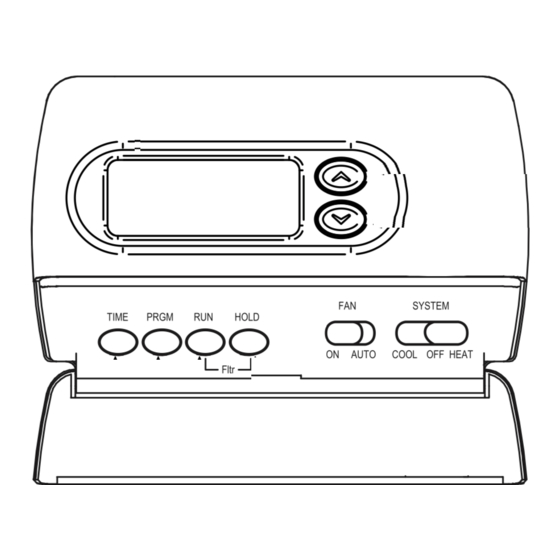
Upgrading Older Models
Older thermostats might miss new features or fail often. Consider upgrading to a newer model for better control. Modern thermostats offer easy programming and energy savings. Upgrades improve comfort and reduce energy bills.
Credit: www.manualslib.com
Frequently Asked Questions
Why Is My White Rodgers Thermostat Not Turning On?
The thermostat may have dead batteries or a loose power connection. Check and replace batteries first.
How Do I Reset My White Rodgers Thermostat?
Press and hold the reset button or remove batteries for one minute, then reinstall them.
What Causes A White Rodgers Thermostat To Show The Wrong Temperature?
Dust or sensor issues inside the thermostat can cause wrong readings. Clean or replace if needed.
Can A Thermostat Wiring Problem Stop White Rodgers From Working?
Yes, loose or damaged wires can prevent the thermostat from working properly. Inspect wiring carefully.
How To Fix White Rodgers Thermostat If Heating Won’t Start?
Ensure the thermostat is set to heat mode and temperature is above room temperature. Check furnace power.
Conclusion
A White Rodgers thermostat not working can cause discomfort at home. Check the batteries and wiring first. Sometimes, a simple reset fixes the problem. If issues continue, consult a professional technician. Regular maintenance helps avoid future troubles. Stay calm and take small steps to solve the issue.
Your heating and cooling will work well again soon. Don’t ignore signs of malfunction to keep your home cozy year-round.