
Is your Crompton fan remote acting up or not responding the way it used to? You’re not alone.
Sometimes, all it takes is a simple reset to bring your fan remote back to life. But how exactly do you perform a Crompton fan remote reset quickly and easily? You’ll discover step-by-step instructions that anyone can follow. By the end, you’ll have your fan working smoothly again, saving you time and frustration.
Keep reading to get your fan remote back on track right now!
Common Reasons For Remote Malfunction
Remote controls for Crompton fans sometimes stop working properly. This can be frustrating when you want to adjust your fan settings. Understanding the common reasons for remote malfunction helps you fix issues quickly. Many problems are simple and easy to solve without expert help.
Battery Issues
Dead or weak batteries are the top reason remotes fail. Batteries lose power over time, especially if the remote is unused. Replace old batteries with fresh ones to restore remote function. Always use the correct battery type for the remote model. Check battery contacts for dirt or corrosion. Clean contacts improve the flow of electricity.
Signal Interference
Remote signals can be blocked or disturbed. Objects like walls, furniture, or electronic devices cause interference. This stops the remote from sending commands to the fan. Keep a clear line of sight between the remote and the fan sensor. Avoid using the remote near strong wireless devices or microwaves. These can disrupt the signal and cause malfunction.
Remote Sensor Problems
The fan’s sensor receives the remote’s commands. Dust, dirt, or damage to this sensor can block signals. Clean the sensor gently with a soft cloth. Check for cracks or damage on the sensor window. If damaged, the sensor might need professional repair or replacement. Proper sensor care ensures the remote and fan communicate well.
)
Credit: www.jiomart.com
Steps To Reset Crompton Fan Remote
Resetting your Crompton fan remote can fix common issues like unresponsive controls or syncing problems. The process is simple and quick. Follow these clear steps to reset your remote and get your fan working smoothly again.
Power Cycle The Fan
First, switch off the fan using the main power button or wall switch. Wait for about 30 seconds to let the fan fully power down. Turn the fan back on to refresh its system. This step often solves minor glitches without further action.
Resetting The Remote Control
Open the remote’s battery compartment and remove the batteries. Press all the buttons on the remote once to discharge any remaining power. Insert fresh batteries and close the compartment. This resets the remote’s internal memory and can resolve control issues.
Re-pairing Remote With Fan
Press and hold the fan’s pairing button, usually found near the motor housing. While holding it, press any button on the remote control. Wait for a signal like a beep or light blink from the fan. This confirms the remote and fan are paired and ready to use again.
Troubleshooting Tips For Instant Control
Having quick control over your Crompton fan is important. Sometimes, the remote may not respond as expected. Simple steps can fix most issues. These tips help you regain instant control easily.
Checking Remote Batteries
First, check the remote’s batteries. Weak or dead batteries stop the remote from working. Remove the batteries and test them with a battery tester. Replace old batteries with fresh ones. Use the correct battery type for best results.
Ensuring Clear Line Of Sight
The remote needs a clear path to the fan sensor. Objects or walls block signals. Hold the remote facing the fan directly. Avoid using the remote from too far away. Keep the distance within the recommended range for smooth control.
Cleaning The Remote Sensor
Dust or dirt on the fan sensor can stop signals. Use a soft cloth to wipe the sensor gently. Avoid using water or harsh chemicals. Clean both the fan sensor and the remote’s front part. This helps maintain strong communication between devices.
Preventive Measures For Remote Issues
Preventive steps help avoid common problems with the Crompton fan remote. Taking care of the remote keeps it working well for a long time. Simple habits can stop many issues before they start. This section covers key ways to keep your remote in good shape.
Regular Battery Replacement
Change the remote’s batteries often to keep it strong. Weak batteries cause poor signal and slow response. Replace batteries every six months or when the remote feels weak. Use fresh, good-quality batteries for best results. Remove batteries if you do not use the remote for a long time.
Proper Remote Storage
Store the remote in a safe, dry place. Avoid places with heat, moisture, or direct sunlight. Keep it away from sharp objects that can damage buttons. Use a small box or drawer to protect the remote. Proper storage stops dirt and damage from daily use.
Avoiding Signal Blockages
Clear the space between the remote and the fan. Objects like walls, furniture, or glass can block signals. Point the remote directly at the fan’s receiver. Keep the remote within its recommended range for best response. Signal blockages cause delays or no response from the fan.
When To Seek Professional Help
Knowing when to seek professional help for your Crompton fan remote reset is important. Some problems may be fixed easily at home. Others require expert attention to avoid damage or further issues.
Calling a professional can save time and prevent frustration. It also ensures your fan and remote work safely and properly. Here are signs that you need expert assistance.
Persistent Remote Failures
If your remote does not respond after multiple resets, it may have a deeper issue. Try changing the batteries first. If the problem continues, the remote might be faulty.
Persistent failures often need a trained technician to diagnose and fix. They can check the internal circuits or replace broken parts. Avoid trying to open the remote yourself.
Hardware Malfunctions
Physical damage to the remote or fan can cause malfunctions. Cracked buttons, broken sensors, or damaged wiring need professional repair. These problems affect the remote’s ability to send signals.
Experts have the right tools to safely repair or replace hardware parts. Fixing hardware issues requires skill to avoid further damage or voiding warranties.
Warranty And Service Options
Check if your Crompton fan or remote is still under warranty. Professional service centers offer repairs covered by the warranty terms. Unauthorized repairs might void your warranty.
Authorized service centers provide genuine parts and reliable fixes. Using these options protects your investment and ensures proper functioning.
)
Credit: www.jiomart.com
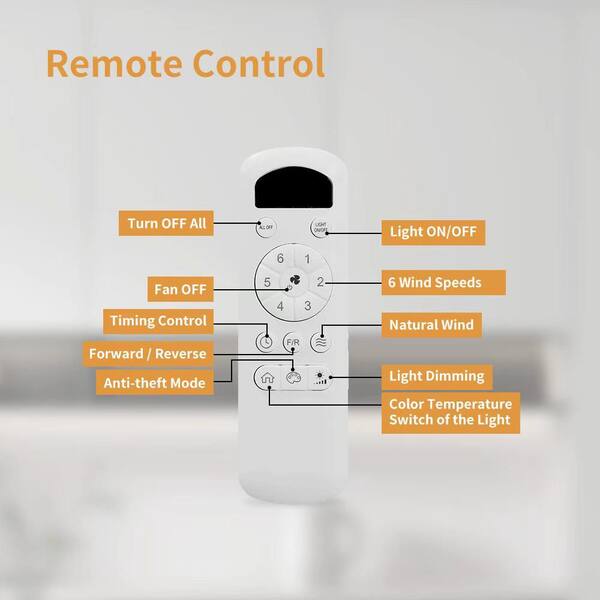
Credit: www.homedepot.com
Frequently Asked Questions
How Do I Reset The Crompton Fan Remote?
Press and hold the reset button on the remote for 5 seconds to reset it.
Why Is My Crompton Fan Remote Not Working?
Check the batteries and ensure they are correctly placed and still have power.
Can I Reset The Crompton Fan Remote Without A Manual?
Yes, hold the reset button or remove batteries for a few minutes.
How To Sync Crompton Fan Remote After Resetting?
Turn off the fan, press the remote’s reset button, then turn the fan on.
What To Do If Reset Doesn’t Fix The Remote?
Try replacing the batteries or check the remote sensor on the fan.
Conclusion
Resetting your Crompton fan remote is simple and quick. Just follow the steps carefully. This helps fix common issues with the remote. You can enjoy smooth fan control again. Keep your remote clean and handle it gently. That way, it lasts longer and works well.
Take a moment to reset if the remote stops responding. A little care goes a long way in keeping your fan running perfectly.