
Is your LG microwave not showing any display? That blinking blank screen can be frustrating, especially when you need to heat your food quickly.
You might feel stuck, unsure if it’s a simple fix or a bigger problem. But don’t worry—this article will guide you through the steps to understand why your microwave’s display isn’t working and what you can do to bring it back to life.
Keep reading to find easy solutions that could save you time and money.

Credit: www.reddit.com
Common Causes Of Display Issues
LG microwave display issues can be frustrating. The screen might stay blank or show no signs of life. This problem can happen for many reasons. Understanding the common causes helps in fixing the issue faster. Below are some typical reasons why your LG microwave might not show the display.
Power Supply Problems
Power supply issues often cause the display to go blank. The microwave might not get enough electricity. A loose plug or a damaged power cord can stop power flow. Sometimes, a blown fuse inside the microwave cuts power. Checking the power source is the first step to find the problem.
Faulty Control Board
The control board acts like the microwave’s brain. It controls the display and other functions. If the board fails, the display may stop working. Faulty control boards often need replacement. Signs include buttons not responding and no display light.
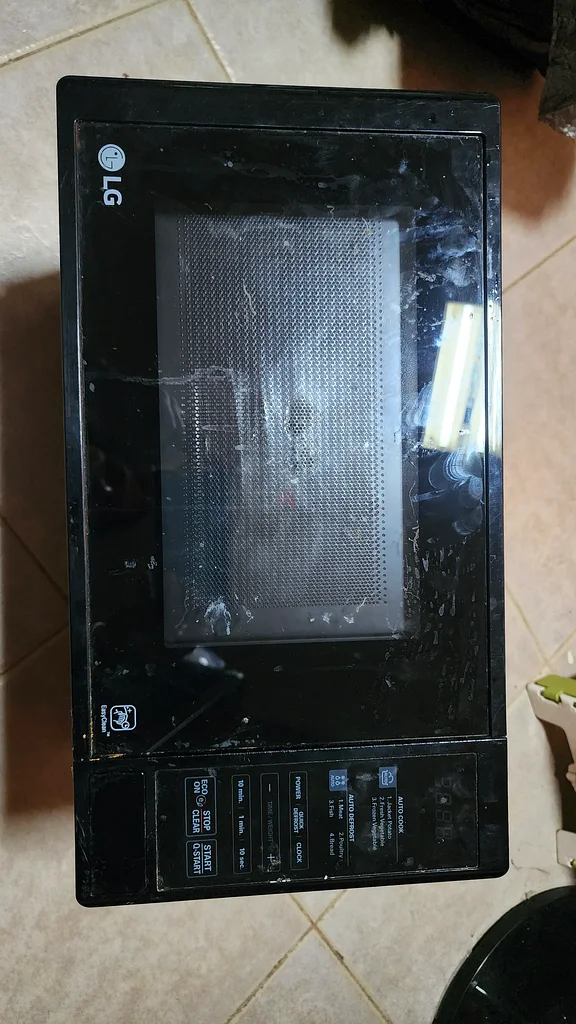
Display Panel Damage
The display panel itself can get damaged. Physical impact or moisture can harm it. A cracked or burnt display panel will not show numbers or symbols. Replacing the panel can restore the microwave’s display function.
Internal Wiring Issues
Wiring inside the microwave connects the power, control board, and display. Loose or broken wires can interrupt signals. Over time, wires might wear out or disconnect. Inspecting and fixing internal wiring can solve display problems.
Credit: rak.dubizzle.com
Basic Troubleshooting Steps
When an LG microwave does not show any display, basic troubleshooting helps find the problem fast. These steps are easy to follow and do not need special tools. Try each step carefully. This saves time and avoids extra repair costs.
Check Power Connection
First, make sure the microwave is plugged in properly. Sometimes, the plug may be loose or not fully inserted. Check the power outlet by plugging in another device to confirm it works. A faulty outlet means the microwave will not get power.
Reset The Microwave
Unplug the microwave from the power source. Wait for at least one minute. Plug it back in. This resets the microwave’s electronics. Sometimes, a simple reset clears minor errors and restores the display.
Inspect The Door Switch
Open and close the microwave door firmly. The door switch signals the microwave to start and show the display. If the switch is damaged or stuck, the microwave won’t work properly. Listen for a clicking sound when the door closes.
Examine Fuse And Circuit Breaker
Check the fuse inside the microwave if you know how. A blown fuse stops power flow to the display. Also, look at the home circuit breaker panel. A tripped breaker can cut electricity to the microwave. Reset the breaker if needed.
Advanced Fixes For Display Problems
Advanced fixes for display problems in an LG microwave help solve complex issues. Basic steps may not work if the display stays blank. This section covers key repairs that often restore the screen’s function.
These solutions require some technical skill and tools. Taking safety precautions is important before starting any repair.
Replace The Control Board
The control board controls the microwave’s display and functions. A faulty board can cause the screen to stop working. Replace it with a compatible part from LG or trusted suppliers. Disconnect power before removing the old board. Installing a new board can restore the display and control features.
Repair Or Replace Display Panel
The display panel shows time, settings, and cooking status. Damage or defects in the panel can cause it to not show anything. Repair options include checking for loose connections or burned components. If damage is severe, replace the whole panel. This fix brings back clear, bright display readings.
Fix Internal Wiring
Wiring inside the microwave connects the display and control board. Broken, loose, or burnt wires disrupt signals and cause display failure. Inspect wires carefully for damage or poor contacts. Repair or replace damaged wires to restore proper connection. Secure wiring prevents future display problems.
Professional Diagnostic Tools
Advanced tools help find hidden faults in the microwave’s electronics. Multimeters, oscilloscopes, and specialized testers check voltage and signal flow. Professionals use these tools to pinpoint exact issues quickly. Using diagnostic tools saves time and avoids guesswork during repair.
Preventive Measures For Display Longevity
Keeping the display of your LG microwave in good shape helps it work longer. Displays can stop showing numbers or settings if not cared for. Simple steps protect the screen from damage and fading. These actions save time and repair costs. Follow these tips to keep your microwave display clear and bright.
Proper Usage Tips
Use the microwave as the manual says. Avoid pressing buttons too hard. Do not use sharp objects on the display. Keep the door closed properly to prevent damage. Use the correct power settings for each cooking task. These small habits protect the screen from wear.
Regular Cleaning And Maintenance
Clean the display often with a soft cloth. Use a damp cloth, not wet, to avoid moisture inside. Avoid strong cleaners or sprays on the screen. Remove dust and grease gently. Regular cleaning prevents buildup that can blur the display. Check the door seals for any dirt or damage.
Avoiding Power Surges
Use a surge protector with your microwave. Sudden power spikes can harm electronic parts. Unplug the microwave during storms or power outages. Stable electricity keeps the display and circuits safe. This simple step stops many common problems.
Timely Professional Servicing
Have a technician check your microwave yearly. Experts find small issues before they grow. They clean inside parts and test the display. Professional care extends the microwave’s life and performance. Don’t wait for the display to fail completely.
Credit: www.lg.com
Frequently Asked Questions
Why Is My Lg Microwave Display Not Working?
The display may fail due to power issues, a blown fuse, or a faulty control board.
How Can I Fix The Lg Microwave Display Problem?
Try unplugging it for a few minutes, then plug it back in to reset.
Does A Blown Fuse Cause Lg Microwave Display Failure?
Yes, a blown fuse can stop the display from showing any information.
Can Moisture Affect The Lg Microwave Display?
Yes, moisture inside the control panel can cause the display to stop working.
When Should I Call A Technician For Lg Microwave Display Issues?
Call a technician if resetting and checking fuses don’t restore the display function.
Conclusion
LG microwave not showing display can be frustrating. Check the power source first. A loose plug or blown fuse often causes this. Clean the control panel gently. Dirt or moisture may block the display. Resetting the microwave might help too.
If the problem stays, contact a professional. Regular care keeps your microwave working well. Small fixes save time and money. Stay calm and follow these simple steps. Your microwave can be back to normal soon.