
Are your Onn speakers suddenly not working? It’s frustrating when you want to enjoy your favorite music, movies, or games, and the sound just won’t come through.
You might wonder if it’s broken or if there’s a simple fix you’re missing. Don’t worry—this guide is here to help you get your speakers back to life quickly. Keep reading, and you’ll discover easy steps to solve the problem and bring your sound back loud and clear.

Credit: www.youtube.com
Common Causes Of Onn Speaker Issues
Onn speakers may stop working for various reasons. Knowing common causes helps fix problems fast. Check these areas first to find what stops your speaker from working.
Loose Connections
Loose cables cause sound issues. Check if the speaker wires are fully plugged. Sometimes, a small pull can disconnect the wire. Secure all cables tightly to restore sound.
Software Glitches
Speakers need updated software to work well. Bugs or errors in software may stop sound. Restart your device or update the firmware. This often fixes small software issues quickly.
Power Supply Problems
Speakers need steady power. Faulty power cords or weak batteries cause failure. Test the power source or replace batteries. Ensure the power outlet works properly too.
Bluetooth Pairing Errors
Bluetooth connection problems block sound output. Check if your speaker is in pairing mode. Remove old device connections and pair again. Move closer to the source device for better signal.
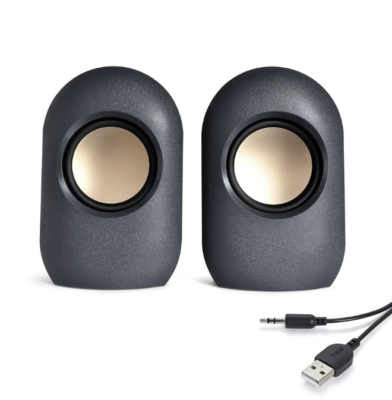
Credit: www.ebay.com
Basic Troubleshooting Steps
Onn speakers not working can be frustrating. Basic troubleshooting helps find simple problems fast. Follow these steps to check your speaker and fix common issues. Each step covers a key area to look at. This guide is easy to follow and saves you time before seeking professional help.
Check The Power Source
Make sure your speaker is properly plugged in. Check the power outlet for electricity. Try another outlet if needed. For battery-powered speakers, ensure the batteries are charged or replace them. No power means the speaker will not work at all.
Inspect Cable Connections
Look at all cables connected to the speaker. Loose or damaged cables can cause sound issues. Unplug and re-plug each cable firmly. Replace any cable that looks worn or broken. Proper connections help the speaker receive sound signals correctly.
Restart The Speaker
Turn off your speaker and wait 10 seconds. Power it back on to reset the system. Restarting clears minor errors that may block sound. This quick step often fixes small glitches without extra effort.
Adjust Volume Settings
Check the speaker volume and device volume levels. Both must be high enough to hear sound. Avoid mute or very low volume settings. Use the speaker’s buttons or connected device controls. Proper volume settings ensure you get clear sound output.
Fixing Bluetooth Connectivity
Fixing Bluetooth connectivity issues with Onn speakers can restore clear sound fast. Bluetooth problems often cause speakers to stop working properly. Checking and resetting the connection helps solve most issues. Follow simple steps to get your speaker connected again.
Re-pairing The Device
Turn off the Onn speaker and your phone or tablet. Wait a few seconds. Turn both devices back on. Go to Bluetooth settings on your phone. Find the Onn speaker in the list and select it. If the speaker does not appear, try putting it in pairing mode again. This step often fixes connection errors.
Clearing Bluetooth Cache
Open Bluetooth settings on your phone. Find the option to clear Bluetooth cache or data. This removes old connection files that may cause issues. Restart your phone after clearing the cache. Try pairing the Onn speaker again. Clearing cache can fix unseen bugs and improve performance.
Checking Device Compatibility
Ensure your phone or tablet supports Bluetooth versions used by Onn speakers. Older devices may not work well with newer Bluetooth technology. Check the speaker’s manual for compatible devices. Using compatible devices guarantees a stable connection. Update your phone’s software for better compatibility.
Software And Firmware Updates
Software and firmware updates can fix many issues with Onn speakers not working. These updates improve the speaker’s performance and fix bugs. Keeping your devices updated helps avoid connection problems and sound errors.
Regular updates ensure the speaker works smoothly with your phone or computer. Sometimes, the speaker’s firmware needs a refresh to fix glitches. Updating both the speaker and the connected device often solves many common problems.
Updating Speaker Firmware
Check if your Onn speaker has a firmware update available. Use the official app or website to find updates. Download and install the update carefully. Do not turn off the speaker during the process. Firmware updates improve sound quality and fix bugs that cause the speaker to stop working.
Updating Connected Devices
Make sure your phone, tablet, or computer is updated. Updates fix Bluetooth and audio issues that affect your speaker. Go to your device settings and check for software updates. Install all available updates. Updated devices connect better with Onn speakers and reduce errors.
Resetting To Factory Settings
Resetting the speaker clears any software problems. Hold the reset button or follow the manual’s instructions. This action restores the speaker to original settings. After reset, you may need to pair the speaker again. Factory reset often fixes persistent software glitches and connection troubles.
Advanced Fixes And Repairs
Advanced fixes and repairs for Onn speakers require careful attention. Basic troubleshooting might not solve deeper problems. Understanding the internal parts and repair options can save time and money. This section covers key steps to help you repair your Onn speakers effectively.
Inspecting Internal Components
Open the speaker carefully to check internal parts. Look for loose wires or damaged connections. Examine the speaker cone for tears or holes. Check the circuit board for burnt spots or corrosion. Use a multimeter to test electrical paths. Replace faulty parts with exact matches. Handle components gently to avoid more damage.
When To Seek Professional Help
Complex issues need expert attention. If you cannot identify the problem, call a technician. Avoid risking further damage by trying advanced repairs without experience. Professionals have tools and knowledge for safe repairs. They can also test the speaker’s performance accurately. Consider their help if repairs take too long or seem too hard.
Warranty And Replacement Options
Check if your Onn speaker is still under warranty. Warranty covers repairs or replacements for certain faults. Contact the seller or manufacturer for warranty claims. Keep your purchase receipt and warranty papers ready. If the warranty expired, explore replacement parts online. Sometimes, replacing the speaker is cheaper than fixing it.

Credit: www.ebay.com
Preventive Tips To Avoid Future Issues
Keeping your Onn speakers working well takes some simple care. Preventive steps stop many common problems before they start. Follow these easy tips to protect your speakers and enjoy clear sound longer.
Proper Storage And Handling
Store your speakers in a dry, cool place. Avoid areas with high heat or moisture. Handle them gently to prevent damage. Never drop or hit the speakers. Use a soft cloth to clean dust off regularly.
Regular Maintenance
Check wires and connections often for wear or loose parts. Clean speaker grills to avoid dust buildup. Test your speakers regularly to catch issues early. Replace damaged cables immediately to keep sound clear.
Safe Usage Practices
Keep volume at a moderate level to avoid speaker strain. Avoid playing music too loud for long periods. Use the right charger and power source for your speakers. Protect them from water and avoid exposing them to rain.
Frequently Asked Questions
Why Are My Onn Speakers Not Producing Sound?
Check if the speakers are properly plugged in and volume is turned up.
How Do I Fix Onn Speakers With No Audio Output?
Restart the device and ensure the audio settings are correctly set to Onn speakers.
Can Software Updates Affect Onn Speaker Performance?
Yes, outdated drivers or software can cause sound issues; update them regularly.
What Should I Check If Onn Speakers Have Static Noise?
Inspect cables for damage and try using a different audio source.
Is It Normal For Onn Speakers To Stop Working Suddenly?
Power issues or loose connections often cause sudden speaker failure; check these first.
Conclusion
Troubles with Onn speakers can feel frustrating. Simple checks often solve the issue quickly. Check connections, volume settings, and device compatibility first. Restart your devices to refresh the connection. Update software and drivers to avoid bugs. If problems continue, contact customer support for help.
Small steps can bring your sound back. Enjoy clear, loud audio once again. Don’t give up—solutions are usually close.