
Are you frustrated because your Cuisinart coffee maker buttons are not working? You rely on your coffee maker every day to kickstart your morning, and when those buttons stop responding, it can throw off your whole routine.
The good news is, you’re not alone—and this problem can often be fixed without calling for expensive repairs. Keep reading to discover easy, practical solutions that will get your coffee maker back to brewing in no time. Don’t let a few stubborn buttons ruin your perfect cup of coffee!

Credit: thekrazycouponlady.com
Common Button Issues
Many users face problems with their Cuisinart coffee maker buttons. These issues can stop the machine from working properly. Understanding common button problems helps fix them faster. Below are frequent button troubles and what they mean.
Unresponsive Buttons
Buttons may not respond when pressed. Dirt or spills can block the button’s sensor. Sometimes, the machine needs a reset. Try unplugging it for a few minutes. If the problem stays, the button may be damaged.
Buttons Stuck Or Jammed
Buttons can get stuck from coffee or residue buildup. Pressing hard or cleaning with a cloth may help. Avoid using sharp tools to fix the button. Sticky buttons need gentle cleaning with a damp cloth.
Intermittent Button Function
Buttons work sometimes but not all the time. This can signal loose connections inside the machine. Check the power cord and plug for damage. A professional may be needed to open and fix internal parts.
Troubleshooting Steps
When the buttons on your Cuisinart coffee maker stop working, it can cause frustration. Simple problems often cause this issue. Following a few clear steps helps you find the cause fast. This saves time and avoids extra repairs. Below are some easy ways to troubleshoot your coffee maker.
Power Cycle The Machine
Unplug the coffee maker from the power outlet. Wait for about one minute. This lets the machine reset internally. Plug it back in and try the buttons again. Power cycling often clears minor glitches. It refreshes the system and can restore button function.
Clean The Control Panel
Dirt and moisture can block button signals. Use a soft, dry cloth to wipe the control panel gently. Avoid harsh cleaners that may damage the surface. Make sure the panel is fully dry before testing the buttons. Regular cleaning keeps the panel responsive and helps buttons work smoothly.
Check For Electrical Issues
Inspect the power cord for damage or loose connections. Test the outlet with another device to ensure it works. A faulty outlet or cord can stop buttons from responding. Replace or repair any damaged parts. Proper electrical flow is essential for your coffee maker’s control panel to function.
Resetting The Coffee Maker
Resetting your Cuisinart coffee maker can fix button issues quickly. This step clears minor errors and restores basic functions. It helps when buttons stop responding or act strange. Two main reset methods can help: a soft reset and a factory reset. Each has a simple process you can follow at home.
Soft Reset Method
Unplug the coffee maker from the power outlet. Wait for about 5 minutes to let it cool down. Plug the machine back in and press the power button. This process clears temporary glitches in the system. Test the buttons now to see if they work. The soft reset often fixes minor electronic problems fast.
Factory Reset Procedure
Locate the reset button or reset option in the menu. Press and hold the reset button for 5 to 10 seconds. Release the button when the display changes or the machine beeps. This resets all settings to factory defaults. Remember, this erases saved preferences like brew strength. Use factory reset only if the soft reset does not help.
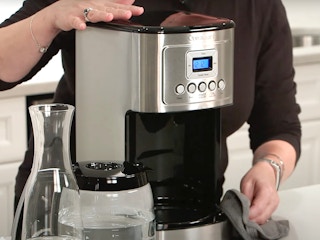
Credit: thekrazycouponlady.com
Maintenance Tips
Keeping your Cuisinart coffee maker buttons working well needs good care. Simple maintenance can stop many problems. Follow these tips to keep your machine in top shape. Small steps make a big difference.
Regular Cleaning Routine
Clean your coffee maker often. Remove old coffee grounds and water stains. Use mild soap and a soft cloth. Avoid harsh chemicals that can damage parts. Clean the control panel gently to keep buttons responsive.
Avoiding Moisture Damage
Keep the buttons dry at all times. Water or steam can cause them to stop working. After cleaning, dry the machine completely. Use a dry cloth to wipe off any moisture. Store the coffee maker in a dry place.
Proper Usage Practices
Press buttons lightly and avoid hard pushes. Do not use sharp objects on the panel. Follow the instructions in the manual. Avoid turning the machine on and off too fast. Treat your coffee maker with care every day.
When To Contact Support
Knowing when to contact support for your Cuisinart coffee maker is important. Button issues can sometimes be fixed at home. Other times, professional help is needed to avoid more damage.
Early support contact can save time and money. It ensures your coffee maker works well and lasts longer. Watch for signs like unresponsive buttons after trying basic fixes. Persistent problems mean it’s time to reach out for help.
Warranty Information
Check your coffee maker’s warranty before seeking repairs. Most Cuisinart models come with a limited warranty. This usually covers parts and labor for a set time.
Keep your purchase receipt and warranty papers ready. Warranty service can fix button problems at no cost. Avoid opening or tampering with the machine, as this may void the warranty.
Professional Repair Services
Professional repair services can handle complex button issues safely. Trained technicians have the tools and knowledge needed. They can diagnose internal faults and replace damaged parts.
Using expert help prevents further damage to your coffee maker. It also ensures your machine works as it should. Choose authorized service centers for reliable repairs and genuine parts.

Credit: cuisinart.pissedconsumer.com
Frequently Asked Questions
Why Are My Cuisinart Coffee Maker Buttons Not Responding?
Buttons may fail due to power issues, dirt buildup, or internal faults. Check power and clean buttons gently.
How Can I Fix Unresponsive Buttons On My Coffee Maker?
Try unplugging the machine, wait a few minutes, then plug it back in to reset it.
Does A Clogged Coffee Maker Cause Button Problems?
Yes, mineral buildup or spills can block buttons. Regular cleaning helps keep them working well.
Can Software Glitches Stop Cuisinart Coffee Maker Buttons?
Yes, some models may freeze. Restarting the machine often clears minor software issues.
When Should I Contact Support For Button Issues?
If buttons stay unresponsive after cleaning and resetting, professional help or repair may be needed.
Conclusion
Fixing Cuisinart coffee maker buttons takes patience and care. Start by checking for dirt or sticky residue. Press each button gently to see if it responds. Sometimes, a simple reset or unplugging helps. If problems persist, consult the user manual or contact support.
Small issues often have easy fixes. Don’t let a faulty button stop your morning coffee. A little effort can restore your machine’s function. Keep your coffee routine smooth and enjoyable.